
SAP Easy DMS
SAP PLM - Ihr Beratungshaus mit mehr als 10 Jahren Erfahrung » SAP Easy DMS (EN)
smart-plm [documents] as a replacement for SAP Easy DMS
Are you moving to S/4 HANA and looking for a full replacement for your SAP Easy DMS installation?
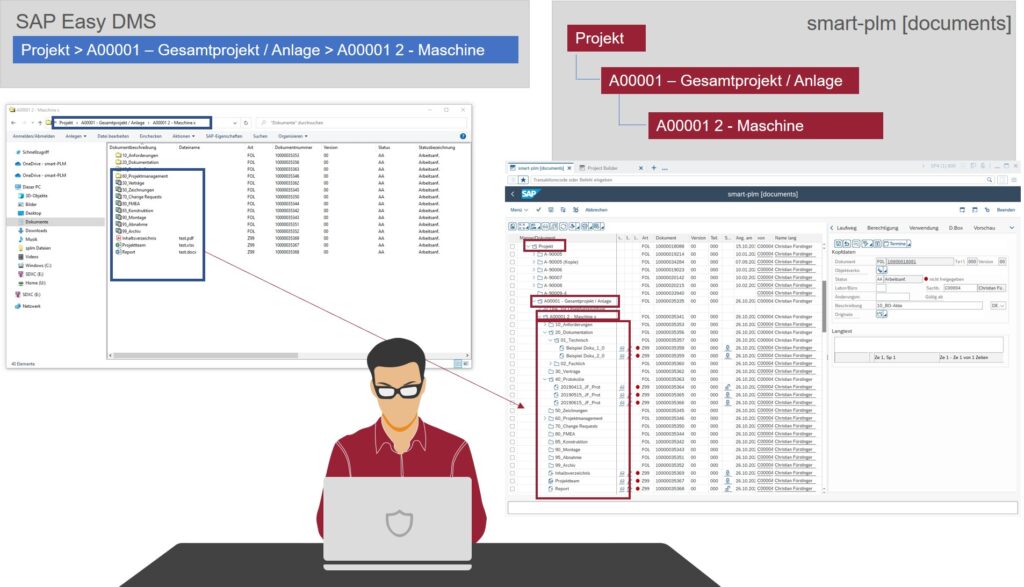
Structure comparison of SAP Easy DMS and smart-plm [documents]!
Continue to use your existing document structures 1:1 in smart-plm [documents] as usual – without migration.
Note!!! SAP Easy DMS is no longer available from S/4 HANA 1511!
What options do I have after SAP Easy DMS?
Our SAP addon smart-plm [documents] is a fully-fledged replacement for SAP Easy DMS!
Click here for the solution:
SAP Easy DMS in detail!
SAP Easy DMS is a desktop installation that you can download from SAP free of charge and install on each PC on which you wish to use it.
The interface and functionality is very similar to Microsoft Windows Explorer.
> In addition, you can extend the functionality of SAP Easy DMS via programming interfaces and adapt it to your own requirements.
OUR SERVICE PORTFOLIO FOR YOU
- Support for the Easy DMS replacement across all project phases
- Conception of the new target architecture without SAP Easy DMS
- Reorganisation of existing Easy DMS folder structures (e.g. in the form of document files)
- Transfer of existing Easy DMS functions / enhancements to the new target setup
- Conception and realisation of individual requirements in the SAP DMS environment
- Maintenance and servicing of existing Easy DMS installations
Our smart-plm solution extension for your DMS
We offer the following additional features
- Automated folder structure creation with pre-defined templates
- Mass upload of documents with automatic synchronisation of folder structures
- Automated alignment of folder structures with SAP hierarchies, e.g. technical space/equipment hierarchy
- Automatic adjustment of folder structures when equipment is installed or removed
- Direct linking of SAP objects (order, BANF, etc.)
- Review and automatic creation of new document versions
- Advanced permission checks when editing folders/documents
- Workflow-based approval request for new/changed documents
Informative
Functional scope of the SAP Easy DMS solution:
- Manage private and shared documents and folders
- Create, copy, delete and move files – also via drag & drop
- Create a new version of a document
- Manage document metadata, e.g. long text and status
- Create and manage authorisations
- Archiving documents throughout the entire product life cycle
- Activate the automatic exchange of properties between Microsoft Office applications and SAP class data in both directions
- Check in, save and check out documents directly in a Microsoft Office application
- Edit and display documents offline and synchronise them with the document management in the backend system when you are back online
- Create and edit documents in the PLM Web UI and SAP GUI
- Send documents as e-mail attachments or links (URL)
- Search for documents and create a search results list
- Edit classification data
- Create object links to BANF, purchase order, material master and much more
- Create display layout and display filter for documents
- Integration in SAP Workflow and SAP Business Workplace
- Search in a selected folder structure
- Call up SAP Easy Document Management in a Windows Terminal Server (WTS) environment.
You can access the application remotely via a secure Internet connection and continue to work in your files. All of the above functions are available in the WTS environment, with the following exceptions: You cannot work offline or perform synchronisation.
Your contact person