

SAP DMS (EN)
SAP PLM - Ihr Beratungshaus mit mehr als 10 Jahren Erfahrung » SAP DMS (EN)
Save time and money with efficient document management from SAP!
The flood of documents will continue to grow in the future!
Every document and every record contains relevant information and needs to be integrated into the business workflow!
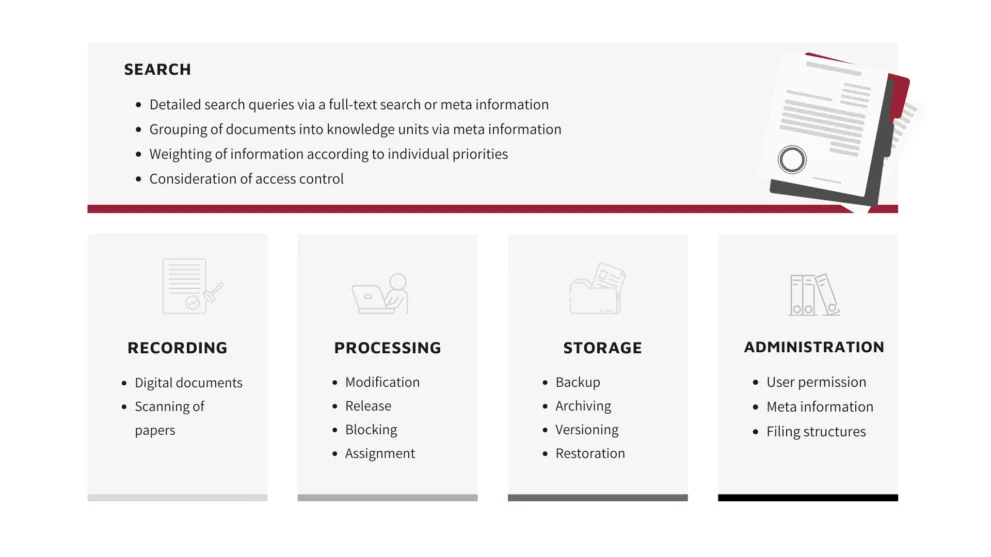
The goal of SAP DMS is to comprehensively manage and process all necessary documents in the company. It does not matter whether the documents originate from SAP or standard software such as Microsoft Office, E-mail programmes or other channels (fax or letter) within the company. What is important for the functionality of a DMS, is the integration with the SAP system and therefore the storage in a central location.
SAP DMS provides access to all technical, business and administrative documents and acts as a comprehensive digital management system for all records and documents in your company. SAP DMS supports the flow of information throughout your organisation and ensures that all records and documents are available when and where they are needed. The benefits to your organisation include significant time and cost savings, increased transparency, and audit and data security.
Meeting the demands of document management in the age of digitalisation and Industry 4.0. No problem! SAP DMS can help. You have all the information in one central place, accessible to all departments, which makes decision making in the company much easier.
Voices of our customers
in the SAP DMS environment
Our customers' success stories

Case study Otto Bihler Maschinenfabrik
In 2019, Otto Bihler Maschinenfabrik introduced SAP S4/HANA company-wide in order to pursue a sustainable digitalisation strategy. To efficiently connect the various departments, from Business to Engineering, the company relies on the SAP add-on smart-plm [documents]. This solution enables standardised SAP document management and thus shortens the paths close to the business process.
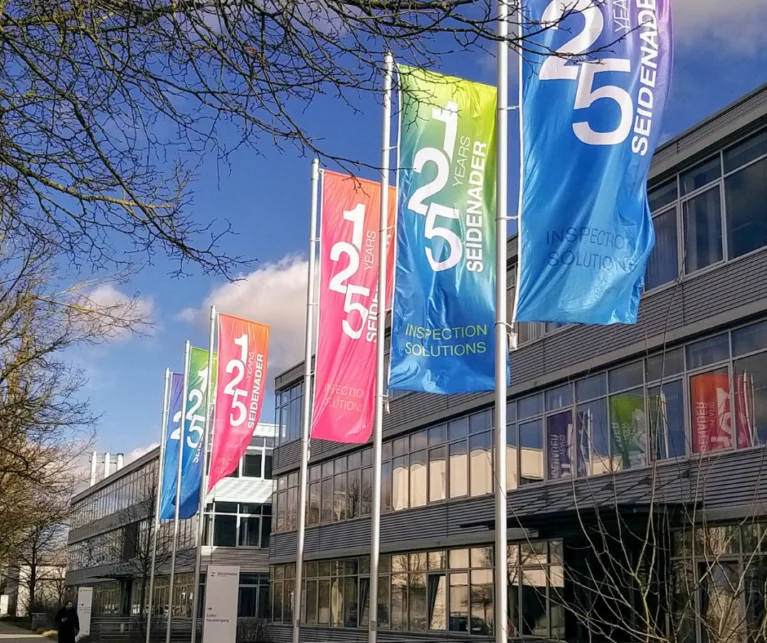
Case study Seidenader Maschinenbau
The use of the modern document management system in SAP enables shorter processing times without media jumps as well as structured document storage with a proven system. This means that required information can be found quickly across departments. It manages and archives documents of all formats in accordance with guidelines. The full benefit only becomes apparent when the processes are available company-wide via a standardised database. At Seidenader, this value is particularly evident in engineering, where an efficient DMS is a central component of a future-proof SAP PLM. Seidenader decided in favour of the SAP add-on smart-plm [documents].
Anwenderbericht Bayern-Chemie
Bayern-Chemie replaced SAP Easy DMS with the S/4HANA-ready, fully SAP-integrated smart-plm [documents], without data migration or additional installation effort. The intuitive interface and the adopted authorization concept enabled rapid user acceptance. Structured maintenance records now ensure transparent, version-controlled, and quickly accessible documents throughout the entire asset lifecycle.Bayern-Chemie replaced SAP Easy DMS with the S/4HANA-ready, fully SAP-integrated smart-plm [documents], without data migration or additional installation effort. The intuitive interface and the adopted authorization concept enabled rapid user acceptance.

“A powerful document management system enables workflow-supported, automated processing throughout the entire life cycle of a document. From creation to filing, from access to archiving. By integrating SAP DMS / SAP DMS into your SAP system, you can access the documents you need from any workstation without losing any time.”
Manfred Aigner, managing director smart-plm Aigner GmbH & Co. KG
Our service portfolio for you in SAP document management
- Significant improvement in user-friendliness through our add-on smart-plm [documents]
- Complete SAP DMS implementation – we accompany you from conception to realisation, go-live and subsequent aftercare
- SAP Easy DMS
- Process optimisation consulting – analysis and harmonisation of SAP business processes (integration of all documents into the business processes)
- Customisation of your specific processes
- Development of solution proposals and concepts in the area of document management and workflow
- Planning, realisation and implementation of legacy data transfer
- Creation of migration concepts
- Migration of documents and originals
- Documentation and testing of your company-specific solutions in SAP DMS
- Maintenance and further development of the existing SAP DMS system Developing of custom SAP DMS solutions and enhancements
- Customising, conversion, classification, interfaces and connection to external systems, web connection
- Creation of a prototype, customised to your specific requirements
- Development of reporting, dialogue and workflow applications
=> Streamlining, acceleration and cost savings through improved process control and transparency!
Our enhancement solutions in SAP DMS
smart-plm [documents]
smart-plm [documents] is an extensible, powerful Document Management System (DMS) add-on for quick access to any number of documents. Designed near the familiar Windows environment, it provides your users with an intuitive experience an an impressive “wow” effect.
Adobe Sign and SAP - Sign in Minutes
Optimise your business processes by combining Adobe Sign with your SAP system. This powerful interface enables the automated exchange of SAP documents via Adobe Sign, which not only significantly reduces the effort for users, but also increases user acceptance.
Microsoft Teams and SAP Documents
Close the gap between your SAP system an Microsoft Teams. This integration avoids silos and significantly increases productivity and user-friendliness. Share documents directly from SAP and promote seamless collaboration within your MS Teams group.
Material BOM Download
The SAP tool simplifies and optimizes the download of documents in material BOMs. It offers extensive selection options for a precise and targeted search for the required documents, a detailed display of the BOM structure and the document info records assigned to material masters via object links.
SAP DMS in den verschiedenen Branchen
The Challenge in the Process Industry
Pharmaceuticals, chemicals, life sciences, or food & beverage – the pressure is particularly high in these industries.
Strict regulations such as GxP, ISO 9001, or FDA 21 CFR Part 11 must be complied with.
Countless documents such as production records, specifications, inspection reports, or SOPs are created every day.
Scattered storage across emails, local drives, or paper archives makes access difficult.
Audits & compliance checks become a burden because documents are often difficult to find quickly.
…
The Challenge in Discrete Manufacturing
Companies in mechanical engineering, the automotive industry, or the high-tech sector face a similar situation:
Thousands of documents are created every day – technical drawings, bills of materials, inspection reports, and project documentation.
They are often scattered across different locations: in the SAP system, on network drives, in emails, or in paper folders.
Employees waste valuable time searching for the latest versions.
Documentation errors lead to production delays or costly rework.
…
Informative information about SAP DMS
SAP DMS provides the following comprehensive functionality:
- Document info record
Contains all information stored for the document (document number, document type, document part, document version, description of a document, definition of responsibility)
- Create, change, display a document
- Viewer for displaying original data
- Search functions
SAP Document Management offers several ways to search for and select documents.
For example, you can search for
– Data from the document info record
– Characteristic values of objects
– Text elements
– Data from originals
– Signature data….
It is also possible to search for documents via a web interface over the Internet to give external business partners direct access to current documents.
- Document parts list
Is a factually structured directory that contains all related documents with details of the document, document type, document part, version and quantity (multiple use, maintenance function for document parts lists, variant parts list as a parts list group). Using a document BOM, it is possible, for example, to manage a complete product that contains a text file, several technical drawings, photos and operating instructions.
- Erweiterung des SAP Systems im Bereich PLM
– Extension of document management
– Enhancements via customer exits/material master
– Enhancement in the class system
– Enhancement in the variant configuration
- Classification in document management
The classification system is used to describe documents using characteristics and group similar documents into classes according to freely defined criteria (classify document in document info record, classify document in class system, change classification data)
- Change management in document management
Engineering change management is used to plan and control changes to documents (create change master record, assign a revision status, change request)
- Document distribution
Documents can be distributed manually or automatically via document distribution (recipient management, authorisation objects for document management)
- Product structure browser
Provides you with information about your product data that is maintained in the Product Data Management (PDM) area (settings and filters for the product structure)
Frequently Asked Questions about SAP DMS
How can SAP DMS be integrated into the existing SAP process landscape?
SAP DMS is generally available and usable without additional licensing costs as part of SAP PLM within the SAP system (Cloud/On-Premise). A centrally managed, unified document repository can replace isolated solutions such as network drives, local storage, and similar systems. By integrating documents managed in SAP into the respective logistics processes (e.g. linking drawing documents to the SAP material master), users have access to the information they need at all times.
What types of documents can we manage in SAP DMS?
In principle, all conceivable business document types can be mapped as so-called “document types” in SAP DMS, including specifications, safety data sheets, drawings, inspection reports, approval documents, and more. There are also no restrictions regarding file formats (CAD and Office formats, PDFs, emails, videos, …).
How does SAP DMS support compliance?
SAP DMS provides audit trails through configurable status networks, versioning, electronic signatures, and a comprehensive authorization concept. This enables you to meet ISO standards as well as FDA and GxP requirements while ensuring audit-proof records for internal and external audits at all times.
How can we improve the efficiency of document searches?
With centralized storage, metadata, full-text search, and intelligent classification, employees can find documents significantly faster. Search times can often be reduced by 30–40%.
What resources are required for implementation?
Typically, a small core project team consisting of IT, PLM managers, and key users is sufficient. SAP DMS can be introduced step by step: first digitizing core processes, followed by integrating additional departments and document types.
Is SAP DMS also suitable for multiple locations or international companies?
Yes. SAP DMS supports multiple languages, different authorization levels, and cross-border compliance requirements. This allows global teams to benefit from standardized document processes.
Your contact person